


Model context protocol
AI-Native Talent Intelligence for Copilots and LLMs
Access global labor market data through the Model Context Protocol. Connect Draup’s talent intelligence graph to your copilots and HR tools for live skills, role, location, and mobility insight, with zero integration friction.
By filling up this form, you agree to allow Draup to share this data with our affiliates, subsidiaries and third parties


Your team gets smarter without changing how it works
No new tab to learn, no data to move, no rip-and-replace. One MCP endpoint meets every team where they already are, so you go live in days, not quarters.
Connect Draup to Claude, ChatGPT, and any MCP client
Extend Copilot Studio, or your own HR agent with Draup MCP
Get Started in Under 2 Minutes
Draup MCP is one secure address guarded by one question: prove who you are. Point your AI client at it, sign in or pass a token, and your agent queries Draup’s skills, role, location, and labor market intelligence in plain English.
Register the Draup MCP Sales endpoint
Connecting a chat app
Go to your client's MCP or connector settings and add custom connector.
Copy Paste your Draup MCP address.
Add the client_id and client_secret Draup provides if you are prompted for them, then click Connect. A Draup login opens in your browser. Sign in, approve access, and you are done. You never touch a config file and you never handle a credential.
Connecting an IDE or custom agent
To register an MCP server, add the configuration below to your IDE's MCP settings file, supported natively in Cursor, Cline, VS Code, Windsurf, and other desktop clients.
Where you can plug it in
Same server, many front doors. Only the mechanics change.
Example: AI Powered Skills Trends Analysis
Draup MCP is one secure address guarded by one question: prove who you are. Point your AI client at it, sign in or pass a token, and your agent queries Draup's account, buyer, and market intelligence in plain English.
Prompt:
You are an HR analyst. Summarize the top five skills gaining demand in {{industry}} over the last {{time_window}}, highlighting growth rates and emerging regions.
Request to MCP
Find the top five emerging skills in the semiconductor industry over the past quarter.
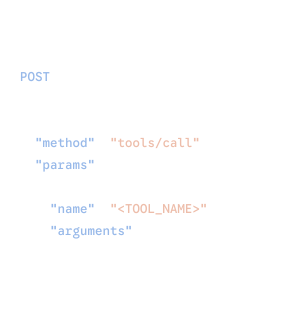
Output
Your copilot queries Draup’s skills dataset through MCP and returns verified, up-to-date context, scoped to exactly what you license.

Analyzing 1B+ data points daily from 100K+ sources
 Real Stories.
 Real Success.
Real Success.









Impactful insights, delivered real-time
Access insights via MCP, A2A, APIs, native integrations, or scheduled data feeds.




.svg)




.svg)
